Lynx - React Native alternative from TikTok


Today(05/03/2025), ByteDance, the company behind TikTok, has launched Lynx, a new framework that aims to revolutionize mobile app development, positioning itself as an alternative to React Native.
Lynx allows developers to build native interfaces using markup and CSS, making it easier to transition into mobile development without needing to learn new languages or paradigms. Additionally, it emphasizes responsible use of the main thread to ensure improved interactivity and performance in applications.
In this post, we'll explore Lynx by creating a simple login screen and sharing our thoughts on this new tool.
Lynx follows a concept similar to React Native, enabling developers to build native interfaces using a declarative approach. However, its key differentiator is its foundation in Rust, which powers the compilation process and other core functionalities, ensuring better performance and efficiency.
Another major highlight is its multi-platform support from day one. With a single codebase, Lynx promises native deployments for Android, iOS, and Web, providing a powerful solution for developers looking to achieve high performance and scalability across different platforms.
Starting a New Project
Creating a new project feels a bit unusual, but it's not painful. We just need to download the app (APK or IPA) and use it to consume the bundle, similar to Expo Go applications. I believe this is only temporary.

The CLI is very simple; we just answer a few questions and get the project set up.

After following all the steps to create the project (using Bun and Offshore), we got this:

Checking the package.json its is very small:

Now, to run the project is very simple, just run:
bun run devOpen the Lynx explorer App, copy the terminal bundle URL and past on the app and hit "Go".

The "Hello, World!" page is very simple and quite similar to a React Native app (which is obvious, since React Native also uses React):
import { useCallback, useEffect, useState } from '@lynx-js/react'

import './App.css'
import arrow from './assets/arrow.png'
import lynxLogo from './assets/lynx-logo.png'
import reactLynxLogo from './assets/react-logo.png'

export function App() {
  const [alterLogo, setAlterLogo] = useState(false)

  useEffect(() => {
    console.info('Hello, ReactLynx')
  }, [])

  const onTap = useCallback(() => {
    'background only'
    setAlterLogo(!alterLogo)
  }, [alterLogo])

  return (
    <view>
      <view className='Background' />
      <view className='App'>
        <view className='Banner'>
          <view className='Logo' bindtap={onTap}>
            {alterLogo
              ? <image src={reactLynxLogo} className='Logo--react' />
              : <image src={lynxLogo} className='Logo--lynx' />}
          </view>
          <text className='Title'>React</text>
          <text className='Subtitle'>on Lynx</text>
        </view>
        <view className='Content'>
          <image src={arrow} className='Arrow' />
          <text className='Description'>Tap the logo and have fun!</text>
          <text className='Hint'>
            Edit<text style={{ fontStyle: 'italic' }}>{' src/App.tsx '}</text>
            to see updates!
          </text>
        </view>
        <view style={{ flex: 1 }}></view>
      </view>
    </view>
  )
}
We can see some differences here. Let's take a look:
CSS Import:
Lynx has excellent CSS support, including gradients, animations, variables, themes, transitions, masking, and much more. It seems they support 100% of the current CSS properties and functionalities.
Hooks from @lynx-js/react:
I don’t have much information about this, but on the Lynx React page, they mention that it’s "the package that provides the ReactLynx framework. ReactLynx not only delivers the ultra-high performance and cross-platform usability of the Lynx engine, but also has compatibility with React 17+ and the vast ecosystem of the React community."
So, I believe it wraps the React library.
The background only directive:
This is pretty cool! Lynx actually has two directives: background and main thread. As the name suggests, background only executes the function in another thread, making it useful for listeners. By using this, we can also reduce the bundle size. Check out the full documentation for a better understanding.
The main thread directive:
This directive is not used on the app page, but I'll talk about it anyway. It forces the code to run on the main thread, as expected, and is very useful for smooth animations and gesture handlers. It is part of the "main thread scripts" which are commonly used for animations and gestures. According to the documentation:
"It is primarily used to address the response delay issue in Lynx's multi-threaded architecture, aiming to achieve a near-native interactive experience."
HTML tags without PascalCase:
Lynx focuses on web technologies with greater fidelity than React Native, and we can see that here. Some core components (view, image, and text) are available by default (check all core components here), and there is no need to import them. Interestingly, they are written in lowercase (flatcase?).
The bindtap prop:
Here we have a slight difference in attribute naming. bindtap works like onPress, a function that returns a touch event.
This was a quick overview of the page. Now, let's take a look at the styles and see how they created the logo animation. (It shakes, and when clicked, it switches to React Native and starts spinning.)
:root {
  background-color: #000;
  --color-text: #fff;
}

.Background {
  position: fixed;
  background: radial-gradient(
    71.43% 62.3% at 46.43% 36.43%,
    rgba(18, 229, 229, 0) 15%,
    rgba(239, 155, 255, 0.3) 56.35%,
    #ff6448 100%
  );
  box-shadow: 0px 12.93px 28.74px 0px #ffd28db2 inset;
  border-radius: 50%;
  width: 200vw;
  height: 200vw;
  top: -60vw;
  left: -14.27vw;
  transform: rotate(15.25deg);
}

.App {
  position: relative;
  min-height: 100vh;
  display: flex;
  flex-direction: column;
  align-items: center;
  justify-content: center;
}

text {
  color: var(--color-text);
}

.Banner {
  flex: 5;
  display: flex;
  flex-direction: column;
  align-items: center;
  justify-content: center;
  z-index: 100;
}

.Logo {
  flex-direction: column;
  align-items: center;
  justify-content: center;
  margin-bottom: 8px;
}

.Logo--react {
  width: 100px;
  height: 100px;
  animation: Logo--spin infinite 20s linear;
}

.Logo--lynx {
  width: 100px;
  height: 100px;
  animation: Logo--shake infinite 0.5s ease;
}

@keyframes Logo--spin {
  from {
    transform: rotate(0deg);
  }
  to {
    transform: rotate(360deg);
  }
}

@keyframes Logo--shake {
  0% {
    transform: scale(1);
  }
  50% {
    transform: scale(0.9);
  }
  100% {
    transform: scale(1);
  }
}

.Content {
  display: flex;
  flex-direction: column;
  align-items: center;
  justify-content: center;
}

.Arrow {
  width: 24px;
  height: 24px;
}

.Title {
  font-size: 36px;
  font-weight: 700;
}

.Subtitle {
  font-style: italic;
  font-size: 22px;
  font-weight: 600;
  margin-bottom: 8px;
}

.Description {
  font-size: 20px;
  color: rgba(255, 255, 255, 0.85);
  margin: 15rpx;
}

.Hint {
  font-size: 12px;
  margin: 5px;
  color: rgba(255, 255, 255, 0.65);
}
It's awesome! We can apply a gradient background directly in CSS, create animations with keyframes (hello to my friend animate.css), and use variables in a native .css file! It's really exciting.
Lets Code
Okay, now I’m going to talk about my experience creating a simple login page with Lynx. I can start by saying: it's very fast and easy to code.
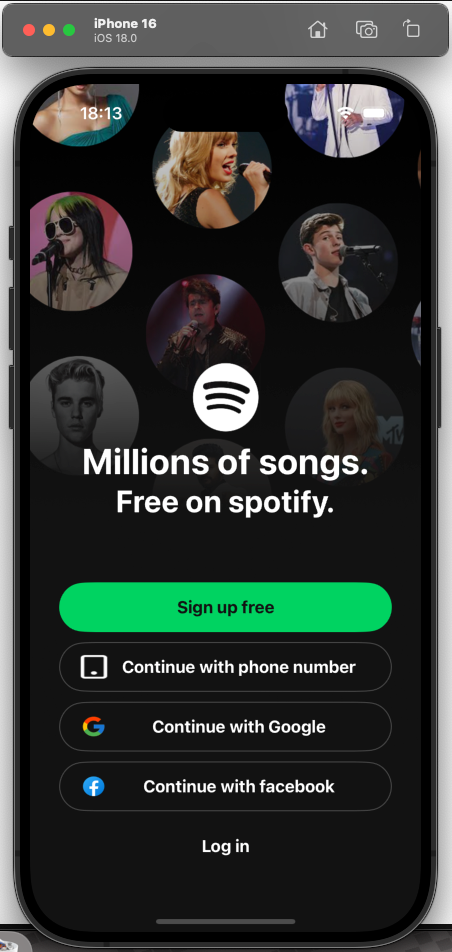
I’ll create a Spotify-like login page. I found this design on Figma and thought it would be a great example to test.

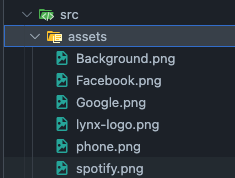
I exported the images and imported into the project folder:
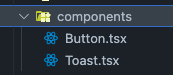
I am created two components only, a Toast (only to show the login success message) and a Button:
import "../App.css";

export function Toast({ text }: { text: string }) {
  return (
    <view className="Toast">
      <text>{text}</text>
    </view>
  );
}
The Toast component is very simple; it's just a view component with text inside. The CSS class .Toast is where the magic happens:
.Toast {
  position: fixed;
  top: 10%;
  left: 50%;
  transform: translateX(-50%);
  width: 80%;
  max-width: 300px;
  background-color: #4caf50;
  color: white;
  text-align: center;
  padding: 15px;
  border-radius: 10px;
  box-shadow: 0 4px 6px rgba(0, 0, 0, 0.1);
  animation: slideDown 0.5s ease-out, fadeOut 0.5s ease-in 3s forwards;
  z-index: 1000;
}

@keyframes slideIn {
  from {
    transform: translate(-50%, -100%);
    opacity: 0;
  }
  to {
    transform: translate(-50%, 0);
    opacity: 1;
  }
}

@keyframes fadeOut {
  from {
    opacity: 1;
    transform: translate(-50%, 0);
  }
  to {
    opacity: 0;
    transform: translate(-50%, -100%);
  }
}
It's really cool to use CSS to create mobile components—it feels like the PhoneGap/Cordova era.
The Button component has more features, but nothing new compared to React Native, except for the CSS classes:
import "../App.css";

export function Button({
  onTap,
  text,
  image,
  type,
}: {
  onTap: () => void;
  text: string;
  image?: string;
  type?: "primary" | "secondary" | "ghost";
}) {
  return (
    <view className={`Button--container ${type}`} bindtap={onTap}>
      {image && (
        <view class="Button--image-container">
          <image src={image} className="Button--image" />
        </view>
      )}
      <view className="Button--text-container">
        <text className="Button--text">{text}</text>
      </view>
    </view>
  );
}
I created some props (onTap, text, image, and type) to make the component more extensible. The only noteworthy part here is the CSS classes. I used template strings to concatenate Button--container with the type value. It could be improved, but...
On the CSS part:
.Button--container {
  display: flex;
  flex-direction: row;
  align-items: center;
  padding: 0px 20px;
  width: 85vw;
  background-color: var(--button-background);
  height: 50px;
  border-radius: 100px;
  margin: 5px;
  border: var(--button-border-size) solid;
  border-color: var(--button-border);
}

.Button--image-container {
  display: flex;
  justify-content: flex-start;
}

.Button--image {
  width: 30px;
  height: 24px;
}

.Button--text-container {
  display: flex;
  width: 100%;
  justify-content: center;
}

.Button--text {
  font-size: 17px;
  font-weight: 700;
  color: var(--button-text);
}
CSS For the button
Nothing new here—I used CSS variables to manage the variants.
So, the final application looks like this:
Dev tool
Lynx has a dev tool similar to React/RN for debugging the application, with some cool additional features.
Unfortunately, I couldn't find the network tab to inspect requests.

My Impressions of Lynx
Lynx is truly amazing! The fact that it supports animations, transitions, gradients, and all the other CSS features that make the web so beautiful and fast — but are not natively supported by React Native — is already a huge advantage!
Additionally, the directives are one of the coolest aspects, something that stands out even more here than in React Native. And, of course, we can’t overlook the power and speed of Rust, which makes hot reload and the build process incredibly efficient.
During these first minutes of development, I only missed two things:
- Console logs – The logs (
console.log) don’t appear in the terminal. I’m not sure if this is an issue with the version I’m using, but I could only see them through the Lynx Dev Tool. - Inconsistent Hot Reload – In some cases, especially when editing CSS and commenting out parts of the code to remove properties, the hot reload stopped working. I had to close and reopen the app to fix it.
Another thing that felt a bit odd was the project startup process. Copying a URL and opening it in their app is somewhat unconventional. It’s not a big deal, but it does feel unusual. Also, the app doesn’t save the last bundle’s URL, something Expo Go handles really well. I imagine this will be improved soon.
Overall, I really liked Lynx! The development experience was super smooth, and to be honest, I’d love to test it in a real production app 🤩.
There are still many features I’m excited to explore, especially the native integration and compatibility with other libraries. I’ll keep testing and sharing everything here on the blog! So, subscribe to the newsletter to get updates as soon as I post — no spam, I promise! 🚀
As usual, here’s the repository with the code I wrote for this post:As usual, here’s the repository with the code I wrote for this post:
 tuliocll